WordPress – Google ‘plus one’ button
I was looking for a decent Google+ plugin for a long time, and I didn’t manage to find one, which could meet all my expectations. For that reason I have modified one, because GPL allows me to do it. The plugins originates from Techlunatic’s pages and was written by Rohan Pawale.
The new version is available: Google (Plus One) Button WordPress plugin by kms.
The plugin’s page on WordPress.org: Google (Plus One) Button by kms on WordPress.org.
UPDATE: Version 1.3.2 corrects the overlapping button problem on the first page. If we choose to display a floating button on the homepage, a single piece will be shown with the base url of the page, not any url for posts.
UPDATE: Version 1.3.1 adds new language support for the benefit of german-speaking users. This makes the admin page available in three languages.
UPDATE: Version 1.2.1 corrects the plugin’s error on the first page. All the buttons were pointing to the base url, not the individual post urls.
Let’s see what it has to offer.
Seamless integration of the Google+ button into the blogba.
It is a great help for all who do not wish to get dirty pushing bits around, and that was the reason for not having a g+ button. Or someone who does like to get bit-dirty, still has good use for the settings panel, but does not want to give up on maximum configuration oversight. So let’s dive into the details.
After installation a new menu item will show in the left-hand menu, from here we can setup all the aspects of the button.
Display
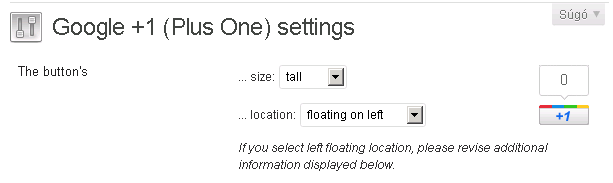
There are four available display modes, as follows:
| Normal | Small | Medium | High |
|---|---|---|---|
 |
 |
 |
 |
Another part of the look-and-feel is the counter in the bubble.

Which pages should display it
It is possible to put the button on the front page, or at the posts on detail view. These two are independent of each other, but the numbers besides the buttons on the front page and post page will show the same number.
Position related to content

It can be shown above or below a post, or even on both places at the same time. Selecting the floating mode additional inputs will be available.
Top and bottom space
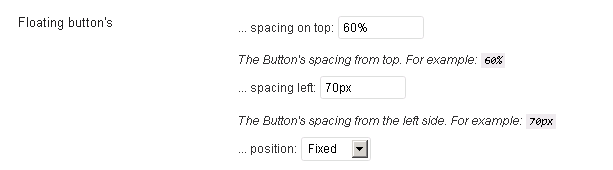
Spaces can be given in percentage, pixel or any other measure, as long it is css-compliant.
Button’s position
Fix: the button is tied to the browser’s window, it will not move even on scrolling.
Absolute: the button is tied to the top left corner of the document, so it will move with the content on scroll.
A little SEO
We can have the script for the button on the bottom of the page, the content gets loaded first, and this can give us a few good points at the people who are browsing using a stopwatch.

Manual placement
At last a little piece for those, who like to tweak around templates and have full control over all the pieces. If you like the settings page, but do not want to sacrifice overall control for it, select “manual” placement and insert the code
<?php rp_gpo_share(); ?> |
where you’d like to see the button.
A little extra to the previous version
If you don’t like the words I have used, or you just want to share the plugin with some friends who speak another language, you can find an actual translation with all text-elements under the languages directory.
The new version is available: Google (Plus One) Button WordPress plugin by kms.
Happy tweaking!
WordPress – Facebook ‘like’ button A development-environment is developing

Dear David,
Thank you very much for your feedback.
Your solution is correct as I see it. I have modified the plugin, so that it loads static css in the header with a link tag like it should, and only the dynamic parts are written above the div (only for ‘left’ alignment).
I would really appreciate if you could check out the new version (1.5.0) for me, or provide me with more details how could I reproduce the bug in a testing environment (without Twitter).
Thank you again, and have a nice weekend.
Andras
[Reply]